VS Code & Cursor Extension
The ISL Language Support extension brings full editor integration for .isl scripts and YAML-based test suites (*.tests.yaml) in Visual Studio Code and Cursor. It pairs the ISL CLI (bundled as a fat JAR) with language services so you can write, validate, run, test, and debug transformations without leaving the editor.
The extension source and packaging live under plugin/ in the repository. For day-to-day setup and troubleshooting, see plugin/SETUP.md and plugin/README.md.
Installation
- Open Extensions (Ctrl+Shift+X / Cmd+Shift+X).
- Search for ISL Language Support (publisher id
isl-teamin open-source builds). - Install the extension, or install from a
.vsixusing Install from VSIX… in the Extensions menu.
You need a Java 21+ runtime on your machine for Run, Test, and Debug (same requirement as the standalone CLI). The extension ships embedded isl-cmd and ISL Debug Adapter JARs under plugin/lib/ so you do not need to build the CLI separately unless you want a custom runtime.
Features
Editing and navigation
- Syntax highlighting for ISL constructs, string interpolation, modifiers, services, and control flow.
- IntelliSense for keywords,
@.services,|modifiers, and variables inferred from the document. - Go to definition and document highlights for clearer navigation in larger scripts.
- Signature help and inlay hints for parameters and types where available.
- Hover documentation driven from the same definitions as completion (built-ins in
isl-language.json).
Validation, actions, and formatting
- Diagnostics for structural issues (balanced braces/brackets), control-flow pairing (
if/endif,foreach/endfor, …), and semantic checks such as unknown functions, modifiers, or variables. - Code actions for common cleanups (for example interpolation simplification, assignment style, small refactors).
- Formatter with indentation, spacing, and format-on-save support (configurable).
Custom extensions (.islextensions)
- Workspace
/.islextensionsJSON for project-specific functions and modifiers with IDE support. - Optional global definitions via
isl.extensions.source(URL or file path), with cache TTL. - See the in-repo guide:
plugin/docs/EXTENSIONS.md.
Run, test, and debug
- Commands such as ISL: Run Transformation, Run with Input File, Validate Current File, and Format Document (see
plugin/README.mdfor the full list). - CodeLens on functions for run, test, debug, and usages where applicable; YAML test entries get their own CodeLens.
- Testing integration with the VS Code Testing API for
.isltests and*.tests.yamlsuites; failed assertions can open a diff view for expected vs actual. - Debug launch support via the bundled Debug Adapter Protocol implementation and default launch configuration.
Snippets and YAML tests
- Snippets for common patterns (functions, control flow, dates, errors, and more).
- Completion tailored for YAML test suites alongside
.islsources.
AI-assisted editors
The extension ships editor-oriented hints (for example Copilot instructions) so assistants in Cursor, Windsurf, and similar tools understand ISL files in context. See plugin/README.md for notes on supported products.
Configuration
All settings are prefixed with isl.. Commonly used options:
| Setting | Purpose |
|---|---|
isl.execution.islCommand |
Path to isl / isl.sh / isl.bat when not using defaults |
isl.execution.javaHome |
JDK/JRE home if java is not on PATH |
isl.validation.enabled |
Toggle diagnostics |
isl.formatting.indentSize / isl.formatting.useTabs |
Formatting style |
isl.extensions.source |
Global URL or path for extension definitions |
isl.extensions.cacheTTL |
Seconds to cache URL-based extensions |
For a JSON example block, see plugin/README.md.
Screenshots
Image paths use Jekyll’s relative_url so they resolve correctly when the site is published under a baseurl (for example /isl/ on GitHub Pages). Plain relative paths like ./img/... would incorrectly resolve under /isl/plugin/img/... for this page.
The captures below live in docs/img/plugin/. They show the ISL extension in VS Code or Cursor with a typical workspace.
Editor, syntax highlighting, and CodeLens
Syntax-colored ISL with inline Run, Test, and Debug actions above functions.
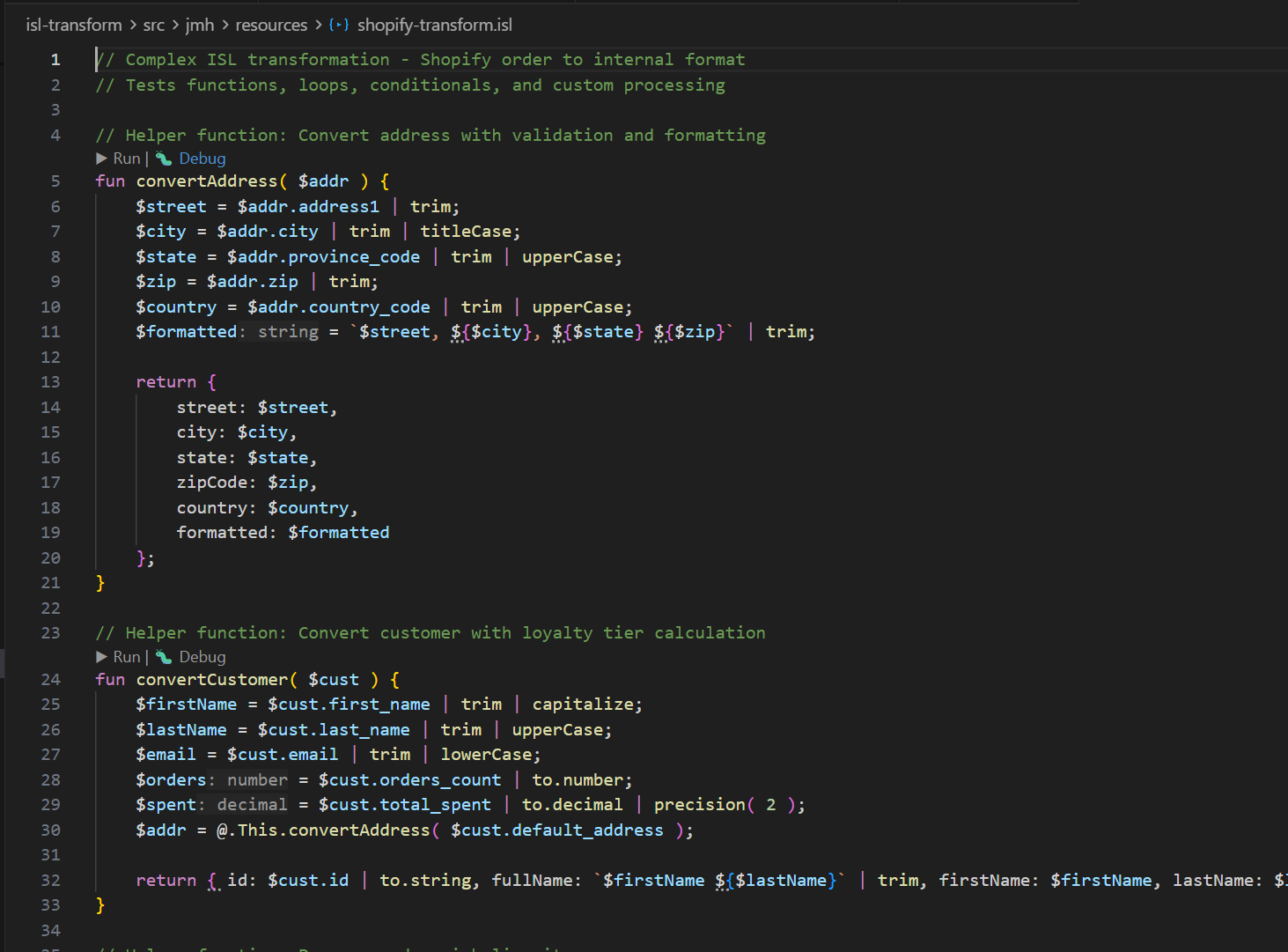
- What you are seeing: language tokens are colorized and function-level CodeLens actions appear directly above executable/testable functions.
- Why it matters: you can execute a transform, run tests, or start a debug session from the exact function you are editing.
IntelliSense
Completion for keywords, services, modifiers, and variables as you type.
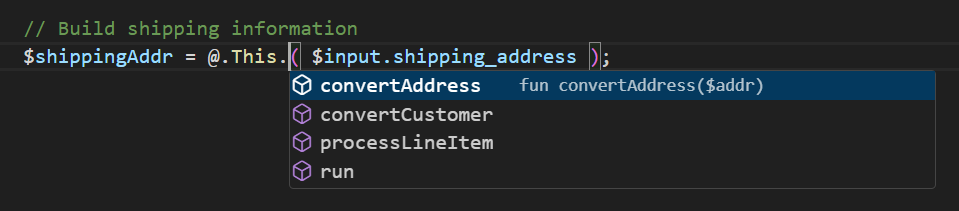
- What you are seeing: context-aware completion suggestions for
@.services,|modifiers, and in-scope variables. - Why it matters: faster authoring and fewer typos when working with built-ins or project extension methods.
Validation and diagnostics
Squiggles in the editor and the Problems view for structural and semantic issues.
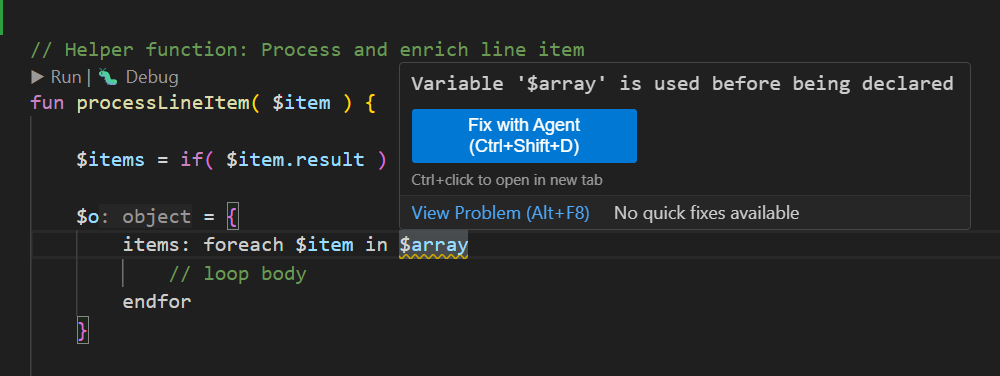
- What you are seeing: inline diagnostics and aggregated issues in Problems for parse/control-flow/function/modifier errors.
- Why it matters: problems are surfaced as you type, reducing feedback loop time before running scripts.
Quick fixes and code actions
Lightbulb-style actions for common cleanups and small refactors.
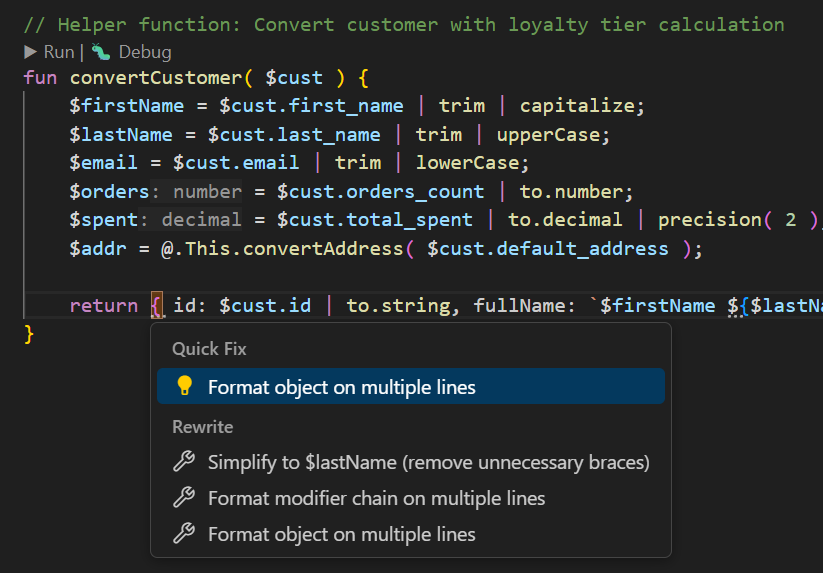
- What you are seeing: quick actions for common patterns (for example cleanup and style normalization).
- Why it matters: repetitive edits become one-click operations, keeping scripts consistent and readable.
Unit tests and mocking
Testing UI for .isl tests (including setup and mocks) from the extension’s test integration.
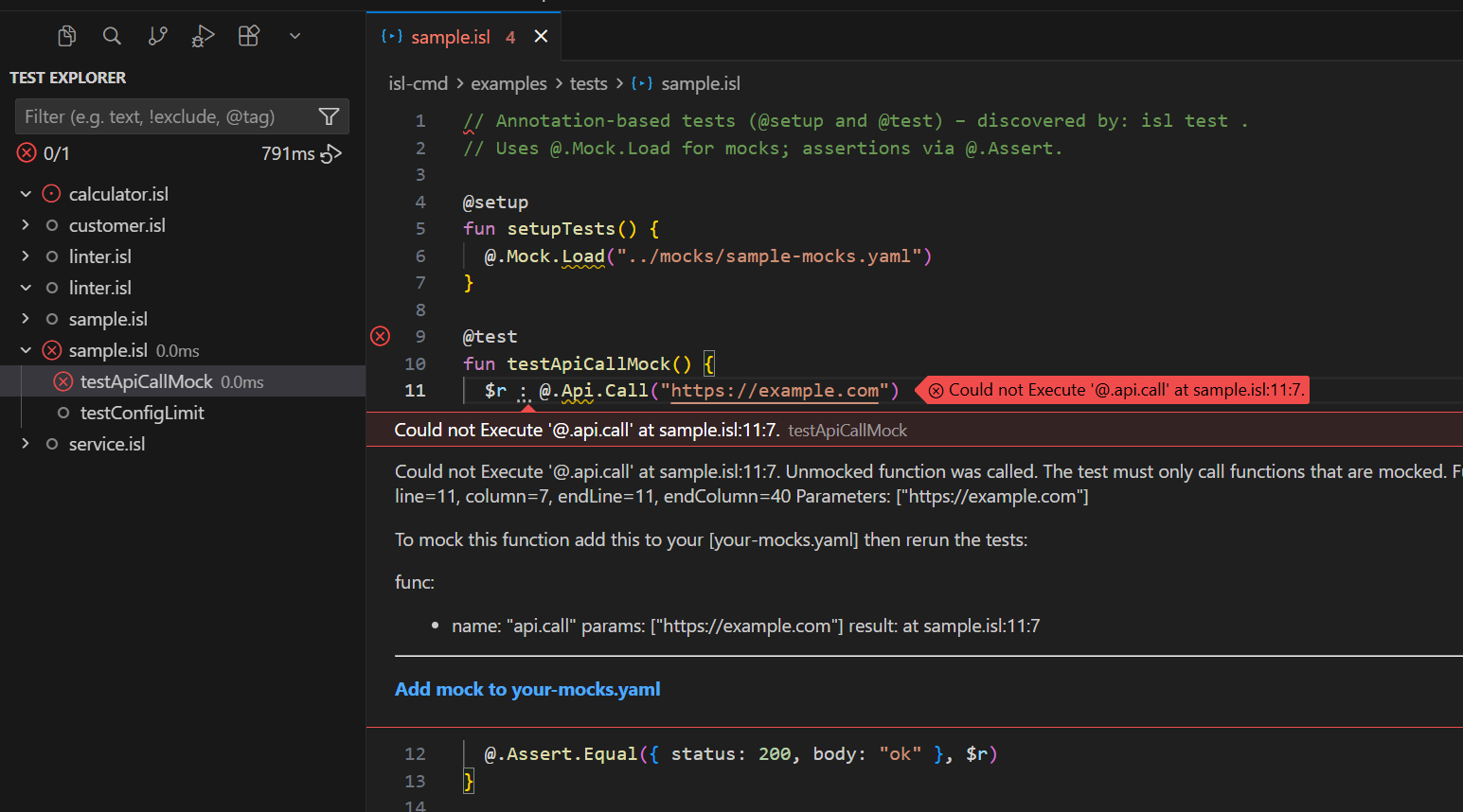
- What you are seeing: test discovery and execution for annotation-based ISL tests and YAML suites with mock support.
- Why it matters: you can validate transforms continuously in-editor and inspect failures quickly.
Debugging
Paused execution with breakpoints, variables, and call stack using the bundled debug adapter.
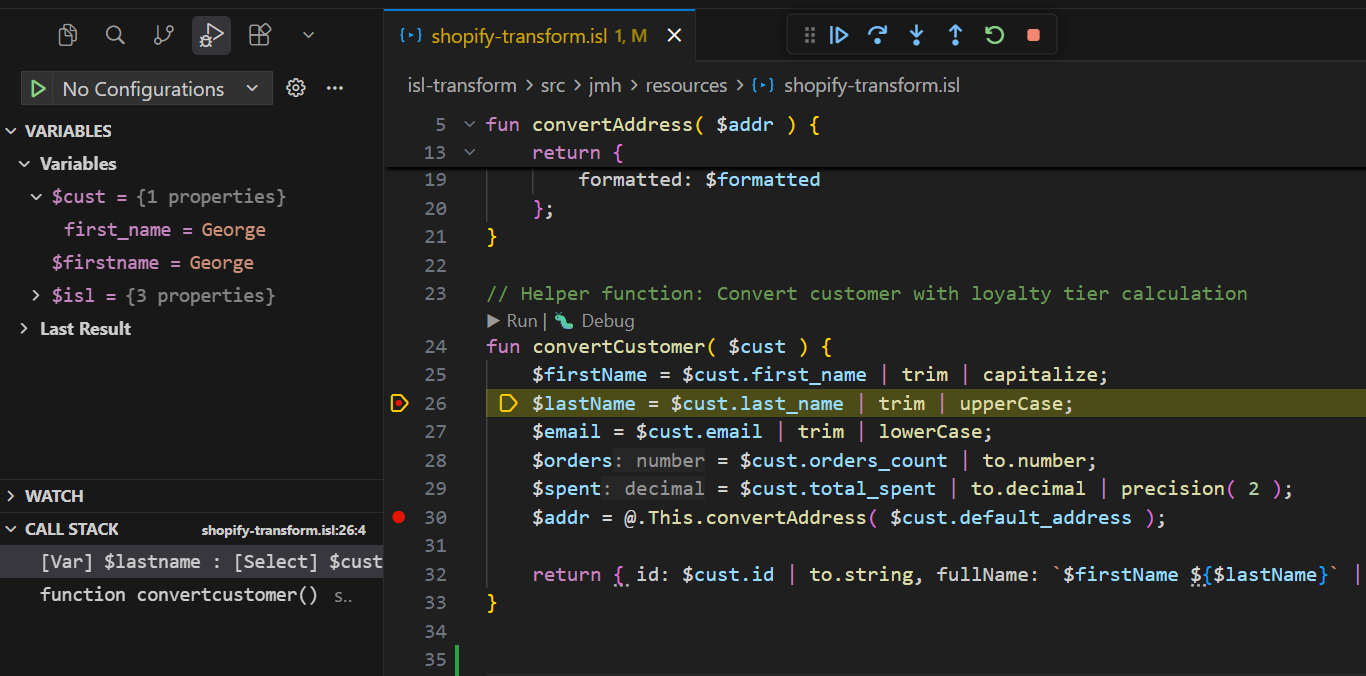
- What you are seeing: an active debug session with breakpoints, variable inspection, and step controls.
- Why it matters: complex transformation behavior can be diagnosed interactively instead of only by output diffing.
.isl file icon in the explorer
The extension contributes a dedicated file icon so ISL scripts are easy to spot next to other languages.

- What you are seeing: custom icon theme mapping for
.islfiles in the Explorer. - Why it matters: large mixed-language repositories are easier to scan and navigate.
To add or replace figures, drop optimized PNG or WebP files under docs/img/plugin/ and update this section.
Related documentation
- Command Line Interface — standalone
isltool (transform,validate,test,info). - Unit testing —
@test/@setupand YAML suites the CLI and editor both understand. - Plugin technical overview — architecture map of
plugin/src.
License
The extension is licensed under Apache 2.0, consistent with the ISL project.